EverForms Custom forms with data stored in your store forever
Build unlimited custom forms with a drag-and-drop builder. Contact, booking, application, survey, wholesale, and more. Unlike other form apps, all submissions are stored directly in Shopify metaobjects—so your data is always yours, even if you uninstall.
See It In Action
From drag-and-drop building to AI-powered form generation and visual workflow automation—see how EverForms makes form creation effortless.
Drag & Drop Form Builder
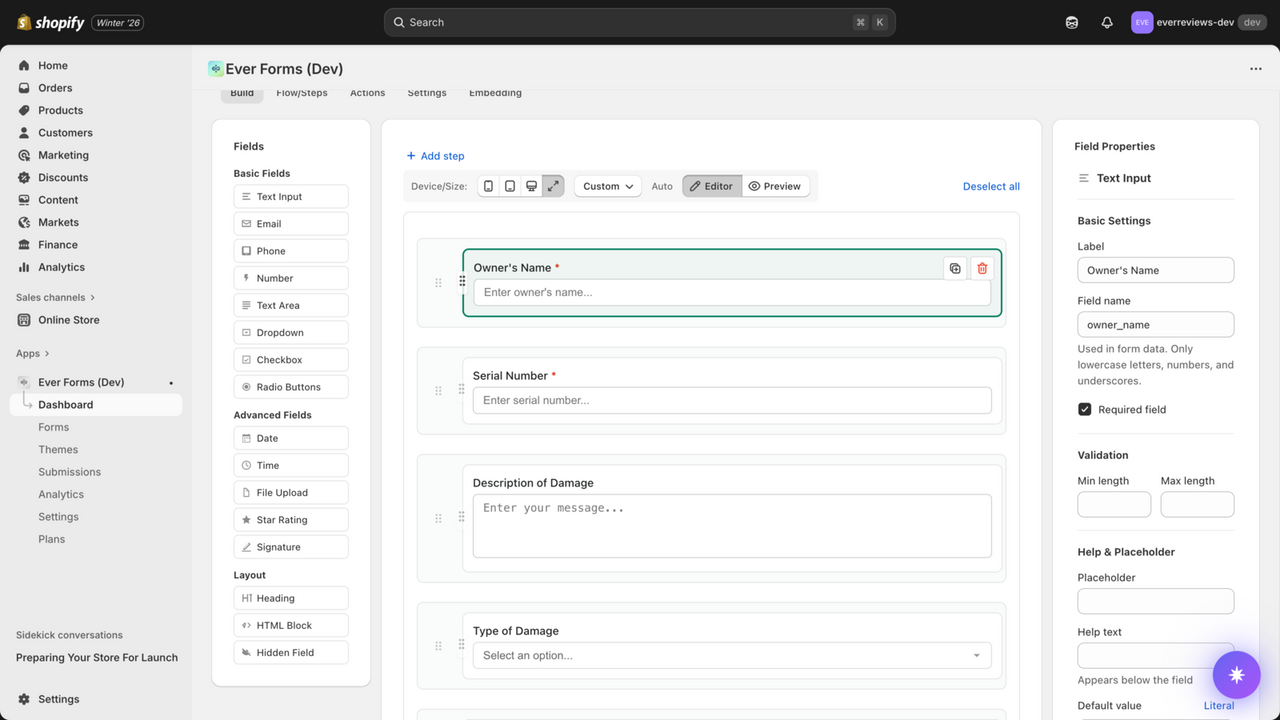
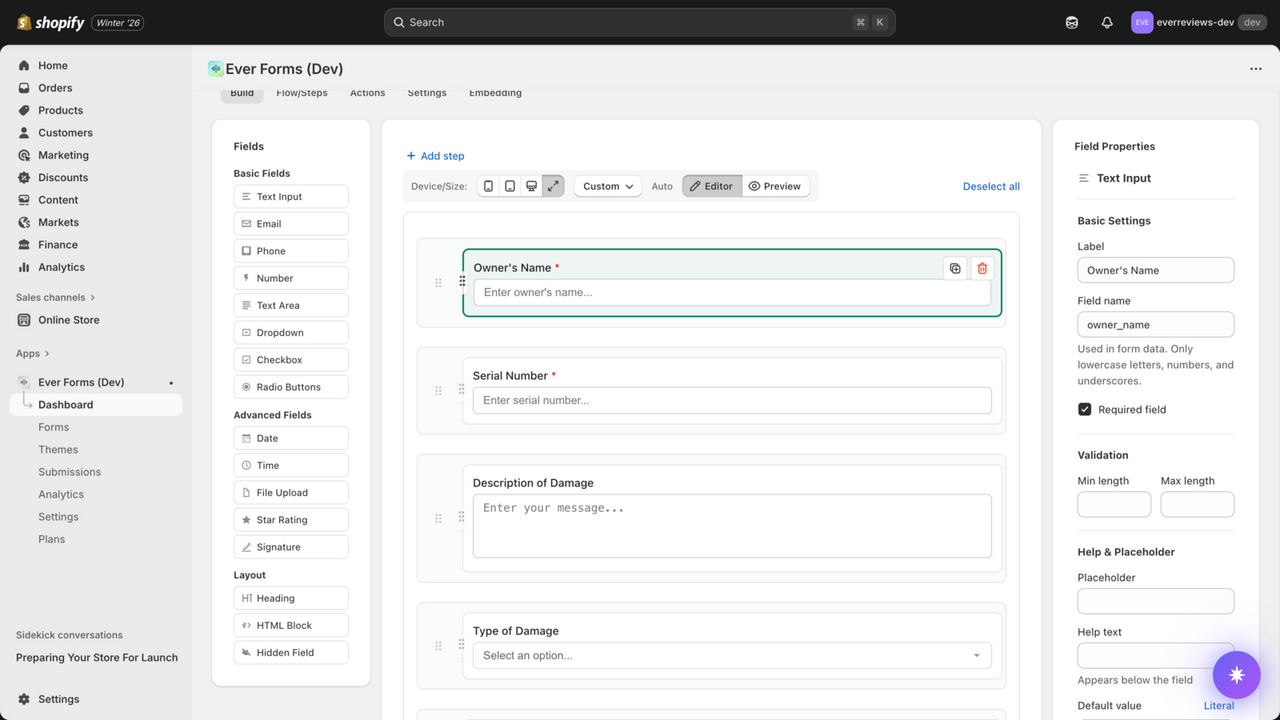
15+ field types including text, email, phone, dropdown, checkbox, radio, date, time, file upload, star rating, signature, and more. Visual canvas with live preview and field properties sidebar.
AI Assistant
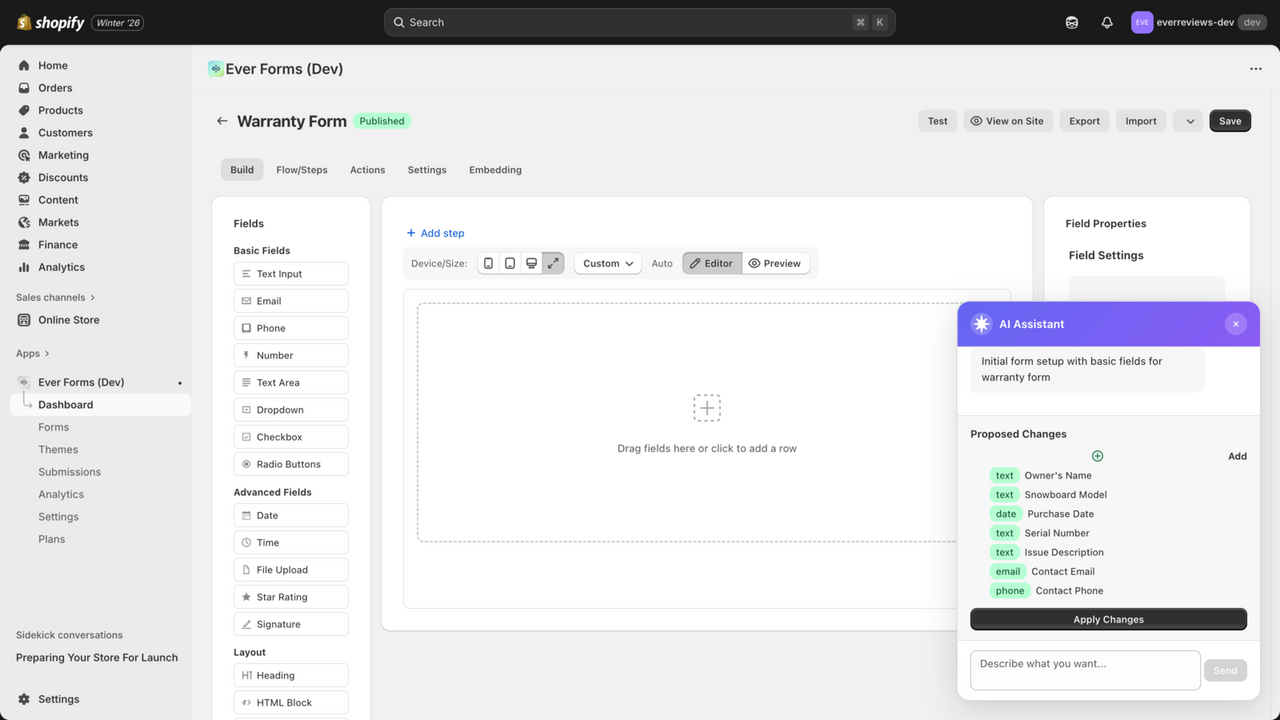
Describe your form and let AI build it for you. The AI Assistant suggests fields, labels, and validation rules based on your description. Apply changes with one click and customize further.
Visual Flow Builder
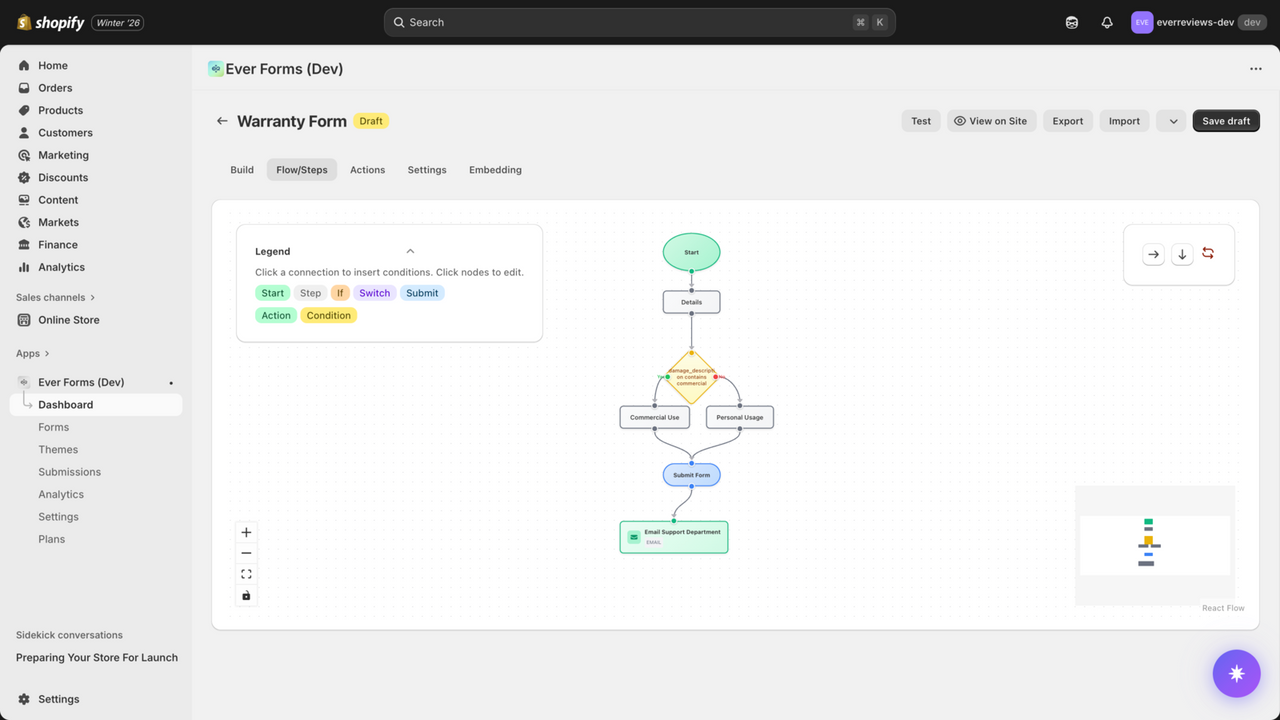
Build conditional logic with a visual flowchart interface. Create branches based on user input, multi-step forms, and automated actions—all without code.
Build Any Type of Form You Need
From simple contact forms to complex multi-step applications. All with the power of Shopify metaobjects keeping your data safe and accessible.
Contact Forms
Simple contact forms with name, email, phone, and message fields. Route submissions to different departments automatically.
Booking Forms
Appointment scheduling, event registration, and service bookings. Collect date, time, and customer details seamlessly.
Application Forms
Job applications, partnership requests, influencer signups. Multi-step flows with file uploads and conditional fields.
AI Assistant
Describe your form in plain English and let AI generate the fields, labels, and validation rules. A powerful differentiator that saves time and gets you started fast.
Survey & Feedback
Customer satisfaction surveys, product feedback, NPS scores. Multiple choice, rating scales, and open-ended questions.
Wholesale Applications
B2B registration forms with business details, tax IDs, references. Approve wholesale accounts directly from submissions.
File Upload Forms
Accept images, documents, and custom files. Perfect for design briefs, custom orders, and product personalization requests.
Newsletter Signup
Grow your email list with custom signup forms. Pop-ups, embedded forms, or full-page registration with preference options.
Pricing Quote Requests
Let customers request custom pricing for bulk orders or special projects. Capture requirements and respond with tailored quotes.
Order Forms
Pre-order requests, custom product orders, subscription signups. Streamline order collection beyond standard checkout.
Why Choose EverForms?
The only form builder that stores your data directly in your Shopify store—not in external databases.
Your Data in Shopify Forever
Form submissions stored as Shopify metaobjects—never locked in external databases. Your data stays with your store even if you uninstall.
Drag & Drop Builder
Build forms in minutes with an intuitive visual builder. Add fields, customize layouts, and set validation rules—no code required.
Conditional Logic
Show or hide fields based on previous answers. Create smart forms that adapt to user input for better experiences.
Automated Workflows
Trigger email notifications, tag customers, update orders—automatically on form submission. No Zapier required.
Custom CSS & JavaScript
Full styling control for advanced users. Match your brand perfectly with custom CSS or add interactive features with JavaScript.
Seamless Theme Integration
Add forms to any page or product with app blocks. Works perfectly with all Shopify themes—no code conflicts.
Get Started in 3 Simple Steps
Build and publish custom forms without any technical knowledge.
Build Your Form
Use the drag-and-drop builder to add fields. Text inputs, dropdowns, checkboxes, file uploads, and more. Set up conditional logic and validation rules.
Publish to Your Store
Add your form to any page, product, or collection using app blocks in the Theme Editor. Style it to match your brand. Preview on mobile and desktop.
Collect Submissions
Customer submissions are stored in Shopify metaobjects. View, search, filter, and export data from your dashboard. Set up automated notifications.
Powerful Features for Every Use Case
Unlimited Forms & Submissions
Create as many forms as you need. No submission limits on any plan.
Multi-Step Forms & Pop-ups
Break long forms into steps. Show forms in pop-ups or modals for better conversion.
File Uploads & Validation
Accept images, PDFs, and documents. Set file type and size limits. Preview uploads before submission.
Perfect For
- Shopify merchants who need custom forms
- Stores collecting bookings or applications
- B2B wholesale businesses
- Service-based businesses on Shopify
- Merchants who value data ownership
Simple, Transparent Pricing
Start free and scale as you grow. All plans include unlimited forms and submissions.
Free
Perfect for getting started with basic forms
- Basic forms
- Limited submissions
- Data stored in Shopify
- Email notifications
Standard
For growing stores with advanced needs
- Unlimited submissions
- Conditional logic
- Multi-page forms
- File uploads
- Webhook integrations
Pro
Billed annually
For power users who need it all
- Everything in Standard
- AI Assistant
- Visual flow builder
- Priority support
- Advanced customization
Frequently Asked Questions
Everything you need to know about EverForms.
What makes EverForms different from other form apps?
EverForms stores all form submissions as Shopify metaobjects, meaning your data lives directly in your Shopify store—not on external servers or proprietary databases. This gives you complete data ownership and portability. Even if you uninstall the app, your form data remains in your store forever. Other form apps lock your submissions in external databases that you lose access to after uninstalling.
Do I need to know how to code?
No coding required! EverForms features an intuitive drag-and-drop builder that makes creating forms easy for anyone. Add fields, set up validation, customize styling, and add conditional logic—all through a visual interface. The app integrates with Shopify's Theme Editor, so you can add forms to your pages without touching code. For advanced users, we also support custom CSS and JavaScript.
What is conditional logic?
Conditional logic lets you show or hide form fields based on previous answers. For example, if someone selects "Wholesale Inquiry" from a dropdown, you can automatically show additional fields for business name and tax ID. This creates smarter, more personalized forms that adapt to each user's needs—improving completion rates and collecting more relevant data.
Can I accept file uploads in my forms?
Yes! EverForms supports file upload fields where customers can submit images, PDFs, documents, and other file types. You can set file type restrictions, size limits, and allow multiple files per field. Perfect for collecting design briefs, custom order specifications, resumes, or any other documents you need from customers.
How do notifications work?
EverForms can send automated email notifications when forms are submitted. You can customize notification recipients, email templates, and even set up different notifications based on form responses. For example, send wholesale applications to your B2B team and general inquiries to customer support—all configured within the app, no external tools needed.
Can I export form submissions?
Absolutely! Since submissions are stored as Shopify metaobjects, you have full access to export and work with your data. EverForms includes built-in export functionality to download submissions as CSV files. You can also access the data programmatically via Shopify's Admin API or use third-party tools that integrate with Shopify metaobjects.
Ready to Build Custom Forms That Work Your Way?
Join Shopify merchants using EverForms to collect bookings, applications, feedback, and more—with data that stays in their store forever.